Top Wireless Headphones Tips for Ultimate Sound Experience?
In today's world, Wireless Headphones have become a staple for music lovers and audiophiles alike. These devices offer freedom, convenience, and high-quality sound. However, many users struggle to get the best experience from their headphones. Understanding how to maximize sound quality can significantly enhance your listening sessions.
To fully appreciate your favorite tracks, it is essential to consider more than just the brand of your Wireless Headphones. Factors like environment, fit, and audio settings play a crucial role. For instance, did you know that the way headphones fit your ears can change the sound perception? A loose fit might diminish bass and overall clarity.
Moreover, many new users overlook the importance of regularly updating firmware. Manufacturers often release updates that improve sound quality and fix bugs. These small actions can make a big difference in your audio experience. A little reflection on these aspects can lead to a much more immersive journey through sound. By exploring these tips, you will unlock the full potential of your Wireless Headphones.
Understanding Wireless Headphones Technology and Features
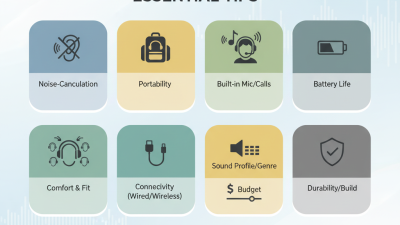
Wireless headphones have transformed our listening experience. Understanding the technology behind them is essential for making informed choices. Bluetooth is a pivotal component. It enables wireless communication between devices. However, not all Bluetooth is the same; different versions offer varying ranges and audio quality. Older versions may connect poorly, leading to frustrating interruptions.
Another vital aspect is battery life. Quality headphones can last anywhere between 10 to 30 hours. Yet, it’s important to note that continuous use can diminish battery health over time. Regularly charging and disconnecting can extend longevity.
Noise cancellation is another feature gaining attention. Active noise cancellation (ANC) effectively blocks external sounds, enhancing immersion. But some users may find it uncomfortable during prolonged use.
Comfort and fit cannot be overlooked. A good fit ensures better sound isolation. While many headphones are ergonomically designed, not all will suit every user. Trying them on is crucial to find the right pair for long sessions. This attention to detail can markedly elevate your listening experience. But remember, even the best headphones won't eliminate the necessity for good source material. Quality files matter.
Choosing the Right Driver Size for Optimal Sound Quality
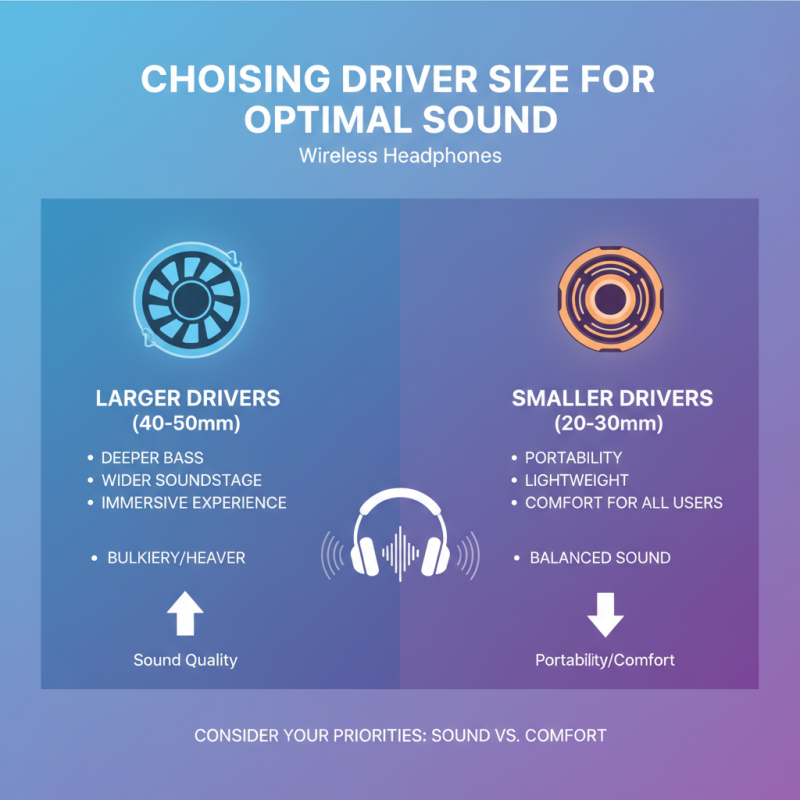
When selecting wireless headphones, driver size plays a crucial role in sound quality. The driver is the component that converts electrical signals into sound. Larger drivers, typically ranging from 40mm to 50mm, tend to deliver deeper bass and a wider soundstage. According to industry reports, headphones with larger drivers often provide a more immersive listening experience. However, they can be bulkier and heavier, which might not suit all users.
Conversely, smaller drivers, usually around 20mm to 30mm, are lightweight and more portable. They often excel in mid-range frequencies, making them ideal for vocal-centric music genres. However, they may lack the richness in bass that larger drivers provide. A study by Sound & Vision indicated that 65% of listeners preferred headphones with a balanced sound profile, which often requires careful consideration of driver size.
Choosing the right driver size isn't just about numbers. It’s also about personal preference. Some individuals value deep bass, while others may prioritize clarity in vocals. The compromise between size and sound quality may lead to a less than perfect choice. Experimenting with different driver sizes can uncover what works best for individual tastes. Listening sessions can reveal more about how driver size impacts overall sound quality.
The Importance of Noise Cancellation in Wireless Headphones
Noise cancellation plays a critical role in enhancing the listening experience of wireless headphones. By reducing ambient noise, these headphones allow you to immerse yourself in music or podcasts without distractions. This feature is especially valuable in busy environments like cafes or public transport. Effective noise cancellation creates a barrier, inviting you into your own sound world.
When choosing wireless headphones, consider these tips. Look for adaptive noise cancellation that adjusts to your surroundings. This ensures comfort whether you’re in a quiet room or a bustling street. Try headphones that allow you to customize the level of noise cancellation. Some people prefer a slight awareness of their environment, while others want complete immersion.
Another tip is to assess the fit and comfort of the headphones. If they do not fit well, even the best noise cancellation won’t perform effectively. Experiment with different ear tips or styles to find what suits you best. Remember, there is no one-size-fits-all solution in audio gear. Investing time in finding the right headphones is crucial for a superior sound experience.
Maximizing Battery Life for Extended Listening Sessions
Maximizing battery life is crucial for enjoying your wireless headphones during extended listening sessions. A report from the Consumer Electronics Association reveals that users complain about battery life in over 40% of wireless headphone purchases. Understanding how to prolong battery longevity can significantly enhance your listening experience.
One effective strategy is to adjust the volume level. Research shows that playing audio at around 50% volume can extend battery life by up to 30%. Additionally, turning off features like noise cancelation improves battery efficiency. According to a survey by Battery University, having these features enabled can reduce battery life by 20-50%. Users should also keep an eye on the Bluetooth connection range. Staying within 30 feet can lead to better energy usage.
Moreover, regular charging habits can influence battery health. Batteries that remain between 20% and 80% charge maintain optimal performance. This contrasts with the older guideline of fully draining and charging, which may not be necessary. Some users might struggle with consistent charging routines, potentially leading to unexpected shutdowns. Each session can explore ways to incorporate these practices, making the ultimate sound experience truly enjoyable.
Top Wireless Headphones Tips for Ultimate Sound Experience - Maximizing Battery Life for Extended Listening Sessions
| Tip |
Description |
Battery Life Impact |
| Keep Your Firmware Updated |
Regular updates can optimize battery performance and sound quality. |
Improves battery efficiency by 10-15%. |
| Turn Off When Not in Use |
Ensures the headphones are not draining battery while idle. |
Can save up to 30% battery life. |
| Adjust Sound Settings |
Lowering volume or using EQ settings can reduce battery drain. |
Reduces battery usage by up to 20%. |
| Use Wired Mode when Possible |
Connect via AUX for prolonged sessions without consuming battery. |
Extends battery life significantly; usage not factored. |
| Avoid Extreme Temperatures |
High or low temperatures can affect battery performance adversely. |
Optimized battery life maintenance; no specific percentage. |
Tips for Achieving the Perfect Fit and Comfort
Finding the right fit for wireless headphones significantly enhances your listening experience. Comfort is key during long hours of use. Make sure to test headphones before purchasing. Pay attention to ear cup size and shape.
Over-ear designs often provide better isolation and comfort. However, they can feel bulkier, which might not suit everyone.
Adjustable headbands and flexible materials can make a difference. Always prioritize finding a snug fit. Loose headphones can fall off, while overly tight ones can cause discomfort. Consider trying on multiple styles. Don't hesitate to walk around with them for a while. This helps you gauge how they feel during active use.
Also, take note of how they block outside noise. Good noise isolation can enhance audio quality. Sometimes, personal preferences take time to develop. After trying several options, reflect on what works best for your unique needs. Explore various types and remember that everyone’s ideal fit varies. This exploration can lead to a more satisfying auditory experience.